![]() |
If you know a little bit about electronics, you probably already seen TVS diodes. If not, these are Transient Voltage Suppressor diodes, placed in parallel as close as possible to the power supply input of the device, which basically sacrifice themselves by going short circuit when the applied voltage exceeds their rated breakdown voltage. Their response time is fast enough to protect the remaining electronics from damage. That’s the good part of the story. Unfortunately, some electronic board designers don’t seem to care about what happens just after that… |
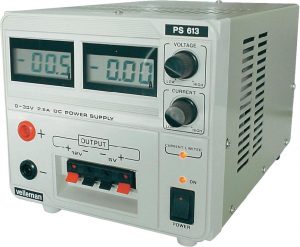
HQ POWER PS613 unleashes its power!
![]() |
This lab PSU is also sold by Velleman, under the same product name. I own it since almost 8 years and I never had to complain about it, aside from its voltage drift that forces to regularly adjust the voltage output. Therefore I had no reason to doubt about it when I needed a 12V power supply for powering the IP cameras I quickly installed, before going to a 2 weeks holidays off the house. Well… what happened next proved me wrong! |
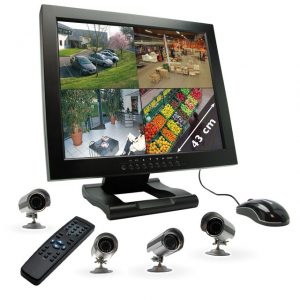
Système de vidéosurveillance CFI-EXTEL, réf.: SVMN 87050 (IPSV 87050), avec écran intégré: que la lumière soit (éteinte)!
N’étant pas certain que cet appareil ait été vendu ailleurs qu’en France, du moins sous la même marque & référence, je vais vous épargner un billet en anglais approximatif 🙂
![]() |
Ce système de vidéosurveillance acheté relativement cher il y a quelques années chez Castorama a quelques points faibles, notamment l’accès à distance par une interface web utilisant des ActiveX douteux nécessitant la levée de nombreuses sécurités sur Internet Explorer. De plus, il est obligatoire d’utiliser Internet Explorer 6, qui n’est plus installable sur des ordinateurs récents, ce qui nécessite l’installation d’une machine virtuelle sous Windows XP. Bien entendu, il ne faut pas compter sur un éventuel accès via votre smartphone. De toutes façons, ce n’était pas encore très répandu à l’époque à laquelle ce produit était commercialisé. Ce problème ne sera absolument pas traité dans ce billet, puisque les sources de l’applicatif embarqué ne sont évidemment pas disponibles. Un autre « défaut » de cet appareil pour les particuliers, c’est le fonctionnement constant du rétro éclairage de l’écran: cela consomme de l’énergie, ça émet de la lumière inutilement, et ça réduit considérablement le temps de vie du circuit d’alimentation du rétro éclairage, comparé au temps passé à surveiller ce qui est affiché. Pour une utilisation professionnelle, dans un poste de sécurité par exemple, cela ne pose pas de problème. La modification proposée consiste à dévier le signal de commande du rétro éclairage, afin de permettre une mise en veille manuelle à l’aide d’une interrupteur. |
Unbricking Linksys WRE54G and WAP54G – When you think you can start digging their graves…
This entry follows an older one I posted almost eight years ago here (link).
Although I tried to make it really clear, I realize that it is not the case, even to me.
![]() |
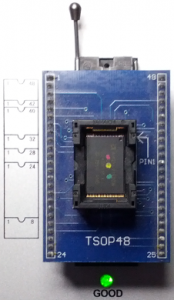
I’ve been contacted recently by someone who visited that other website and who was facing the same frustrating issue with his WAP54G. The device was totally bricked, as well as his two WARE54G. Sometimes you can strap pins, sometimes you can access the shell and enter the magic commands, and sometimes (should I say most of the time) you can just hate yourself for having done something wrong. Hopefully, such mistakes can be easily fixed as long as you have the appropriate tools. To do so, you’ll need:
The universal programmer is certainly the missing device on your workshop but you might have access to one at the university, at work or at your local electronics shop. You can e-mail me in last resort but you should check the shipping costs to/from France first because it might be more costly than a new device. 05/01/2015: The whole detailed procedure for desoldering & soldering the chip is now available ->HERE<-. . |
Ouaps’s « Jojo » is not only a toy for your kid!
![]() |
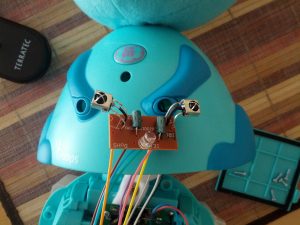
Christmas is not too far away from now and Santa Claus already brought me a gift: a nice faulty electronic toy 🙂 http://dl.shibby.fr/blog.shibby.fr/Toy_repair/JojoPotDeColleRemoteControlProtocol.pdf |


The war is not over!
![]() |
I just couldn’t stay with so many questions and so few answers, so come check back the protocol descritpion in the next few weeks 😉
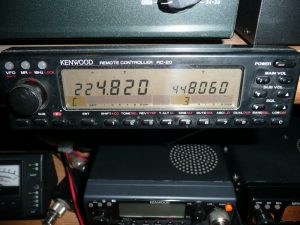
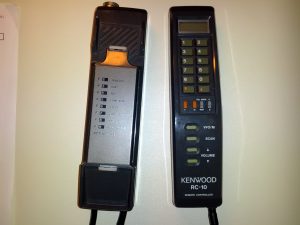
I’ve made a scan of the RC-20 Instruction manual, since it’s not available anywhere else, maybe it will be useful to someone. |
Trying to find RC-20 commands
![]() |
Well, I think the protocol description I’ve made is pretty much complete, now it’s time to try every other command than the ones sent by the RC-10 and see what happens (by « see what happens » I mean « pray that the transceiver won’t blow up »). I’ll write a simple program on a Renesas microcontroller that will convert UART frames sent from my computer with Docklight into a synchronous « SPI like » data frame to the TM-241.I’ll try to update this entry ASAP with some test results.
10/07/2012: Well, after trying to use the R8C/25’s integrated USART peripheral for days and a strong headache, I’ve finally capitulated and written a software protocol based on the Timer RA in « Pulse Width Measurement » mode. It uses the clock signal generated by the transceiver to send and receive data. That’s the good news. The bad news is that the transceiver doesn’t seem to accept any command above 0x3F, so after all this hard work I still don’t know how the RC-20 sends its commands, which is a little bit frustrating. I did not waste my time anyway since I’ve found the purpose of some other bits from the LCD indicators bit field, but I would have liked to find more about the RC-20… |
First steps…
![]() |
The LA1034 is now connected to the MIC plug. The communication protocol seems to be SPI, at least that how I’m decoding it with the « Synchronous Serial » interpreter. The frequency can be easily identified but there are still lots of things to discover: ![]() 09/19/2012: One more evening spent playing with the RC-10. I’ve found how to set the TM-241E to correctly send the frequency to the RC-10, but it disables all other informations in the data frame. At least I know my RC-10 is not faulty, the TM-241E seemed to use the RC-20 protocol to send the data out, which caused the erroneous frequency on the RC-10’s LCD. Now that I have almost all data frames I think I can start to write the protocol specifications. I’ve also found hidden functions on the RC-10. I’ll post all that stuff in a PDF ASAP. 09/21/2012: I’ve finally had some time to write some description of the protocol. This is still a draft though. Protocol Specifications |
Just received my RC-10!
|
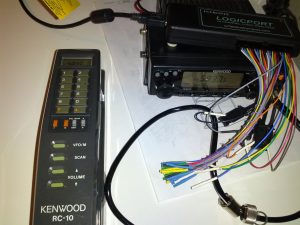
Well, I have nothing much to say, excepted that it seems to work, which is a pretty good thing for what I intend to do with it. However, its LCD displays disjointed stuff, like 40.00 all the time, or 40.40, or 40.80 … don’t know why. I can only see the frequencies stored in the transceiver’s memories and call channel, but not the VFO. The VFO data sent by the transceiver seems to be followed by some other data that are mistakenly interpreted as the frequency, so every frequency I set is displayed on the RC-10 then automatically erased with the 40. »something ». This « something » seems to be a bit field that indicates the power level (LOW, MID & HIGH). Anyways, it shouldn’t stop me from hacking it! Now I have to open the MIC plug and connect the logic analyzer. To be continued… |
First entry….
![]() |
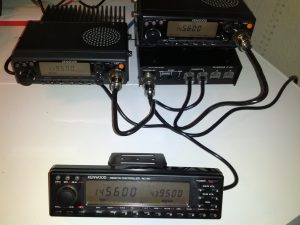
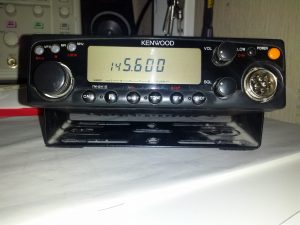
I’ve been looking for informations about Kenwood’s RC-20 remote control for a long time and I’ve finally stumbled upon this blog recently: http://n9xlc.blogspot.fr/search/label/TM-241a I’ve never been able to lay hands on one of these remote controls on eBay, mainly because they were too expensive or because the sellers didn’t want to ship it to France. So thanks to this blog I’ve discovered that there was another device that could control my transceivers: the RC-10. I don’t know if they both have the same functions, but I’ve found an RC-10 that I should receive next week and I’ll torture it with my protocol analyzer to hack its protocol too, because I just can’t wait for N9XLC to provide the whole commands list 🙂 Besides the technical challenge, my goal is to be able to build a stand-alone board that would allow me to control my transceivers from anywhere, via an embedded web server for instance. This could lead me to build some kind of repeater controller board… who knows… what do you think about that? |